
Font Family Structures
Font families can be structured in many ways, but most families are one of three types: RIBBI, Axis-based (Static), or Variable. In general, standard applications should be able to support the first two types: RIBBI and Axis-based. Variable fonts are used mainly for the web and require special application support to handle the various axes.
RIBBI families
Section titled “RIBBI families”Traditionally most digital font families were distributed as a set of four standard styles: Regular, Italic, Bold, and Bold Italic (RIBBI). Applications built their UIs based on this structure, with B and I buttons. This traditional structure is becoming much less common, and applications that make this assumption in their UIs will find that an increasing number of font families will not work well, which may be frustrating to users.
Axis-based families
Section titled “Axis-based families”Axis-based (or Static) font families generally go beyond the standard Regular, Italic, Bold, and Bold Italic styles. They commonly provide a wider range of weights such as Thin, ExtraLight, Light, Medium, SemiBold, ExtraBold, and Black. They may also provide other styles as well, such as different widths. They are called Axis-based as the styles refer to specified points along one or more axes, but each font file provides only a single (static) instance.
Some applications have trouble with these families, and may display these other weights as separate font families (except Bold). Ideally, an application should see, for example, Gentium as one family with ten styles rather than as separate fonts.
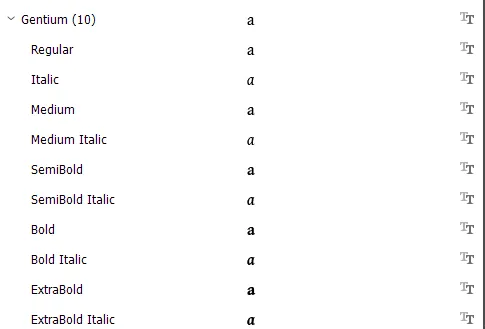
The application should then allow the user to specify which weights should be used for specific uses (text, headings, emphasis, etc.) through a styles mechanism, similar to how it is handled in CSS. Adobe InDesign is a good example of an application that handles Axis-based families well - and that does not have B or I buttons.
Variable fonts
Section titled “Variable fonts”Variable fonts have all the potential styles in a single font file - or two if italic is included. They are primarily used in web-based applications, and in that environment they can be more flexible than static fonts. Variable fonts allow the user to specify the style as a set of arbitrary values along all provided axes, such as:
- weight (the most common axis)
- width
- optical size
Sliders or input fields are generally used to set the exact values required, but other UIs are possible. Standard CSS properties like font-weight, font-style, or font-variation-settings can be used to fine-tune the preferred values.
Introducing variable fonts gives more details on Variable fonts.